Twiends with address : www.twiends.com is known as the site for increasing your Twitter followers . For those who have not registered and would like to try can register at the above address, is guaranteed to have twitter follower increases .
When you are sign in to Twiends, there is no menu to Sign - out . when the browser is closed and then run/open again , your twiends account status is still sign in.
The way to logout / sign out from Twiends is by removing the twiends cookies in the browser
For Mozilla Firefox :
• Run Mozilla Firefox . Close Twiends if still open
• Select Options Menu
• Select the Privacy tab
• Click Remove individual cookies

• Select twiends.com then click Remove Cookie , or click Remove All Cookies to delete all cookies.

• Click Close.
For Google Chrome Browser :
• Run Chrome, Close Twiends if still open
• Press Ctrl + Shift + Del to go to the Clear Browsing Data menu
Or click on the menu (top right ) , then click Tools , and select Clear Browsing Data

• Select Delete cookies and other site and plug-in data
• Click the Clear browsing Data button

• To try , open twiends.com , its status is sign out now.
See Also:
• How to Set Automatic Reply in Office 2010
• How to Know RDP Version
• How to Block Website in My Computer
When you are sign in to Twiends, there is no menu to Sign - out . when the browser is closed and then run/open again , your twiends account status is still sign in.
The way to logout / sign out from Twiends is by removing the twiends cookies in the browser
For Mozilla Firefox :
• Run Mozilla Firefox . Close Twiends if still open
• Select Options Menu
• Select the Privacy tab
• Click Remove individual cookies
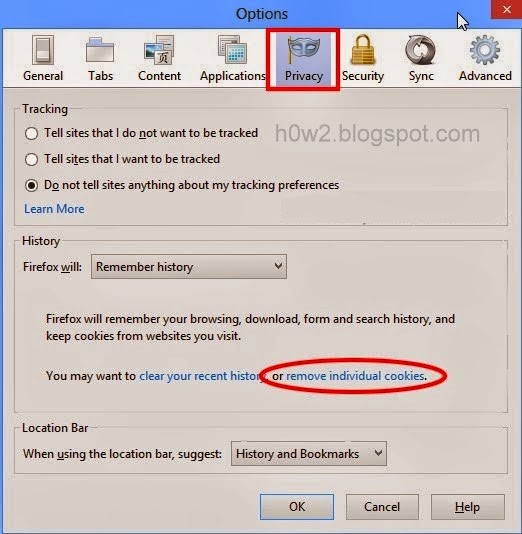
• Select twiends.com then click Remove Cookie , or click Remove All Cookies to delete all cookies.

• Click Close.
For Google Chrome Browser :
• Run Chrome, Close Twiends if still open
• Press Ctrl + Shift + Del to go to the Clear Browsing Data menu
Or click on the menu (top right ) , then click Tools , and select Clear Browsing Data

• Select Delete cookies and other site and plug-in data
• Click the Clear browsing Data button

• To try , open twiends.com , its status is sign out now.
See Also:
• How to Set Automatic Reply in Office 2010
• How to Know RDP Version
• How to Block Website in My Computer